Start with the approved audio. Write down the words and sounds needed to understand the action, synchronize them and check the file in the player the audience will use.
Work from the video that will be published
Record the final file name and duration. Gather the audio track and the approved spelling for brand and product names and measurements. If a shot or pause changes, check timing again. That avoids approving captions that fit an earlier cut.
Decide what a viewer watching in silence needs to know
W3C describes captions as synchronized text for speech and sounds needed to understand the content. Identify a different speaker if the image leaves it unclear. Include a sound when it conveys an action, information or a response that matters.
In this exercise the click matters because it confirms closure. The background music stays in the background and does not change the instruction in this case. When a voice or effect serves a different purpose in your video, reconsider what needs to be included.
Put three moments from the example into text
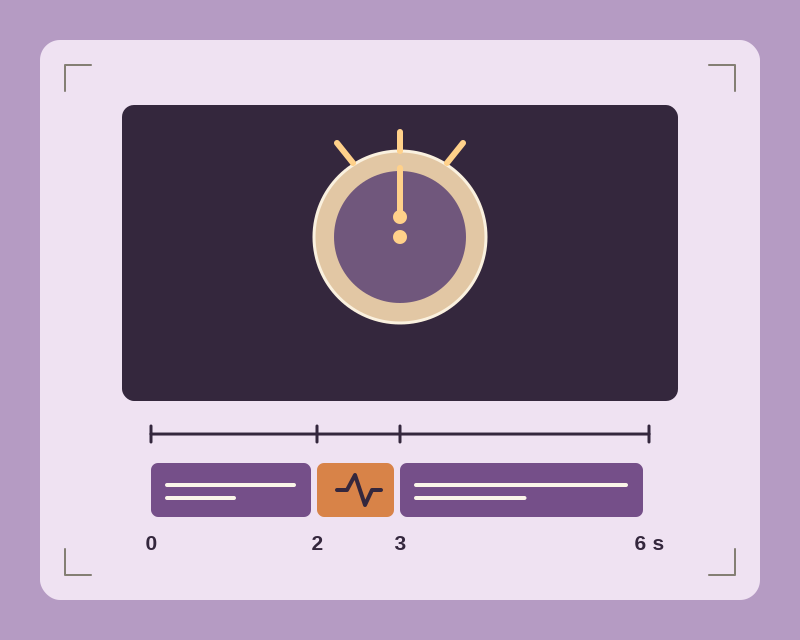
From 0 to 2 s the presenter says “Turn the lid until it stops.” From 2 to 3 s there is a click and the caption “[Lid clicks]” appears. From 3 to 6 s the presenter says “Now check that the mark lines up with the dot.” Keep the three lines in the order they happen.
A transcript for later reading can bring them together. Timed captions let viewers match each line to the relevant moment and image. Rehearse each line break with the audio and make sure the click appears as it happens.
Check the automated draft against the audio
Suppose the draft misses the click and says “turn the cup.” Listen to correct the noun and add the sound cue. Check negations, numbers, names and sentence endings. A quick spelling pass can leave errors that change the action.
Then play the video without sound. Make sure you can follow the turn and still see the dot on the lid. If a caption covers it, try another available position or revise the composition.
Check the delivery copy
Keep the video, language, caption file version and the reviewer’s name. For a selectable track, make sure it can be turned on in the destination player. If captions are built into the picture, check cropping at actual size. Ask someone who has not heard the audio to read it once and explain the instruction.
Follow the evidence.
Sources checked November 9, 2026. The exercise scenarios and figures are fictional. Our editorial standards.