Parte del audio aprobado. Escribe las palabras y los sonidos necesarios para entender la acción, sincronízalos y revisa el archivo en el mismo reproductor que usará el público.
Trabaja sobre el video que se va a publicar
Anota nombre y duración del archivo final. Reúne la pista de audio y las grafías aprobadas de marca, producto y medidas. Si cambian un plano o una pausa, vuelve a comprobar los tiempos. Así evitas aprobar subtítulos que encajan en una versión anterior.
Decide qué necesita saber quien mira en silencio
W3C describe los subtítulos accesibles como texto sincronizado que incluye habla y sonidos necesarios para comprender el contenido. Distingue la voz de otra persona cuando la imagen deja dudas. Incluye un sonido cuando aporta una acción, información o una respuesta que importa.
En el ejercicio importa el clic porque confirma el cierre. La música de fondo queda en segundo plano y en este caso no modifica la instrucción. Cuando una voz o un efecto cumpla otra función en tu video, vuelve a decidir qué debe quedar.
Pasa tres momentos del ejemplo a texto
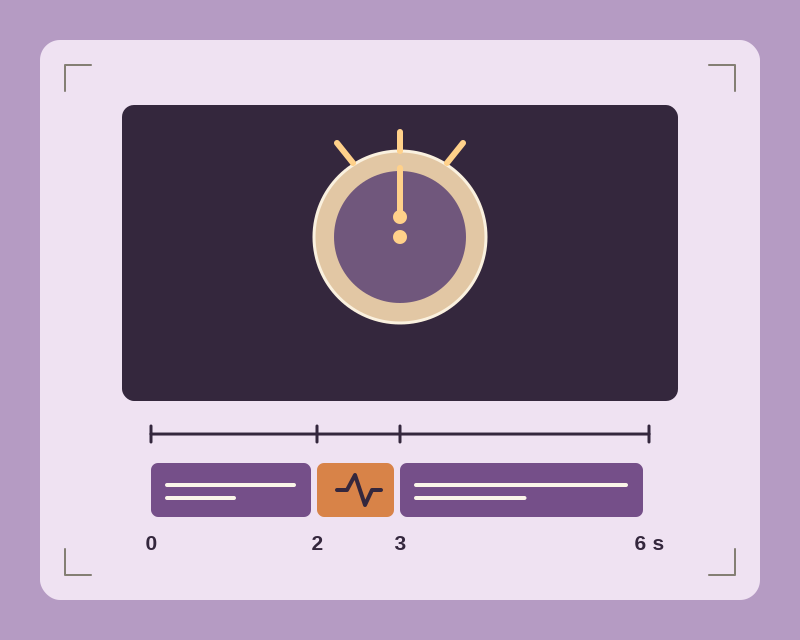
De 0 a 2 s la presentadora dice «Gira la tapa hasta el tope». De 2 a 3 s se oye el clic y aparece «[Clic de la tapa]». De 3 a 6 s dice «Ahora comprueba que la marca coincide con el punto». Conserva las tres líneas en el orden en que ocurren.
Una transcripción para leer después puede reunirlas. El subtítulo sincronizado permite relacionar cada línea con el momento y la imagen correspondientes. Ensaya el corte de cada línea con el audio y busca que el clic aparezca cuando ocurre.
Revisa el borrador automático contra el audio
Supón que el borrador omite el clic y escribe «gira la taza». Corrige el sustantivo escuchando el audio y añade la señal del sonido. Revisa negaciones, cifras, nombres y finales de frase. Una pasada rápida de ortografía puede dejar errores que cambian la acción.
Después reproduce el video sin sonido. Comprueba que puedas seguir el giro y que el subtítulo permita ver el punto de la tapa. Si se superpone, prueba otra posición disponible o corrige la composición.
Comprueba la copia de entrega
Guarda video, idioma, versión del archivo de subtítulos y nombre de quien hizo la prueba. En una pista seleccionable comprueba que se pueda activar en el reproductor de destino. Si los subtítulos van integrados en la imagen, revisa el recorte en el tamaño real. Encarga la última lectura a alguien que pueda explicar la instrucción sin haber escuchado el audio.
Accessible captions for a short brand video
In a fictional video, a flask brand shows how to check that its lid is closed. A person watching in silence sees the hand turn the lid. The click that confirms closure is lost unless someone carries it over into text.
Start with the approved audio. Write down the words and sounds needed to understand the action, synchronize them and check the file in the player the audience will use.
Work from the video that will be published
Record the final file name and duration. Gather the audio track and the approved spelling for brand and product names and measurements. If a shot or pause changes, check timing again. That avoids approving captions that fit an earlier cut.
Decide what a viewer watching in silence needs to know
W3C describes captions as synchronized text for speech and sounds needed to understand the content. Identify a different speaker if the image leaves it unclear. Include a sound when it conveys an action, information or a response that matters.
In this exercise the click matters because it confirms closure. The background music stays in the background and does not change the instruction in this case. When a voice or effect serves a different purpose in your video, reconsider what needs to be included.
Put three moments from the example into text
From 0 to 2 s the presenter says “Turn the lid until it stops.” From 2 to 3 s there is a click and the caption “[Lid clicks]” appears. From 3 to 6 s the presenter says “Now check that the mark lines up with the dot.” Keep the three lines in the order they happen.
A transcript for later reading can bring them together. Timed captions let viewers match each line to the relevant moment and image. Rehearse each line break with the audio and make sure the click appears as it happens.
Check the automated draft against the audio
Suppose the draft misses the click and says “turn the cup.” Listen to correct the noun and add the sound cue. Check negations, numbers, names and sentence endings. A quick spelling pass can leave errors that change the action.
Then play the video without sound. Make sure you can follow the turn and still see the dot on the lid. If a caption covers it, try another available position or revise the composition.
Check the delivery copy
Keep the video, language, caption file version and the reviewer’s name. For a selectable track, make sure it can be turned on in the destination player. If captions are built into the picture, check cropping at actual size. Ask someone who has not heard the audio to read it once and explain the instruction.
给品牌短视频制作无障碍字幕
在一段虚构视频中,某保温杯品牌演示如何确认杯盖已经关好。静音观看的人看见一只手转动杯盖。如果没人把确认闭合的咔哒声写进字幕,这条信息就丢了。
以已确认的音轨为准。记录理解动作所需的话语和声音,调整同步时间,再用观众实际使用的播放器检查。
使用即将发布的视频版本
记录最终文件名和时长。准备音轨,以及确认过的品牌、产品和计量写法。如果镜头或停顿改了,再查一次时间,避免把只适合旧版本的字幕通过审核。
判断静音观看的人需要知道什么
W3C 将无障碍字幕描述为与音频同步的文字,其中包含理解内容所需的对白和声音。画面无法辨认说话人时,可以注明谁在说话。声音如果提供重要的动作、信息或反馈,就写进去。
在这个练习中,咔哒声确认杯盖已经关好。背景音乐在本例里不改变说明。如果你的视频中某段声音承担了别的功能,再判断需要保留哪些信息。
把例子中的三个时刻写成文字
第 0 至 2 秒,主持人说“把盖子拧到底”。第 2 至 3 秒响起咔哒声,字幕显示“[杯盖咔哒一声]”。第 3 至 6 秒,主持人说“现在检查标记是否和圆点对齐”。按发生顺序保留三行。
供事后阅读的文字稿可以把它们放在一起。同步字幕让观众把每行文字与对应时间和画面联系起来。对着音频试读每行的切分,让咔哒声在实际响起时显示。
用音轨检查自动生成的草稿
假设草稿漏掉咔哒声,还把“盖子”写成“杯子”。听音频纠正名词并补上声音提示。检查否定词、数字、名称和句尾。快速校对拼写可能漏掉改变动作含义的错误。
然后静音播放。确认能跟上拧盖动作,同时看到盖子上的圆点。如果字幕遮住圆点,尝试播放器提供的其他位置,或调整画面构图。
检查交付版本
保存视频、语言、字幕文件版本和检查人姓名。如果字幕轨道可以单独选择,就在目标播放器里确认能打开。如果字幕已经嵌入画面,用实际显示尺寸检查裁切。最后请一位没听过音轨的人看一遍,复述操作方法。
Fuentes y método
Fuentes consultadas el 9 de noviembre de 2026. Los casos y datos numéricos de los ejercicios son ficticios. Editorial standards · Disclosures.