Define los dos eventos de cierre y publica el calendario aplicable. Conserva las horas observadas y la regla de cada pausa para poder reconstruir la medición.
Acuerda qué evento termina cada reloj
En el ejemplo, ambos empiezan cuando entra una solicitud válida. El primero termina cuando una persona del equipo responde con un siguiente paso específico. El segundo termina cuando se confirma la solución acordada. Decide de antemano qué ocurre con los acuses automáticos y con las reaperturas.
Atlassian documenta condiciones de inicio, pausa y cierre para sus mediciones de nivel de servicio. Usa esas preguntas para describir tu acuerdo y el registro que lo respalda.
Fija el calendario de atención
El caso ficticio usa de lunes a viernes de 09:00 a 17:00, en una sola zona horaria y sin festivos en el intervalo. Anota esas condiciones antes de calcular. Si existe un objetivo distinto para un canal, guarda el calendario que corresponde a cada solicitud.
El reloj de calendario cuenta la espera real. El de atención acumula los minutos que caen dentro del horario aplicable. El acuerdo debe indicar cuál usa para cada compromiso.
Sigue la solicitud del viernes al lunes
Una persona reporta el viernes a las 16:40 que no puede descargar un archivo. El equipo responde el lunes a las 09:15, pide un dato a las 09:30, lo recibe a las 10:15 y confirma la solución a las 11:30.
| Evento | Hora | Registro |
|---|---|---|
| Entrada | Viernes 16:40 | Inician los dos relojes |
| Primera respuesta | Lunes 09:15 | Termina el primer reloj |
| Espera documentada | Lunes 09:30–10:15 | 45 minutos |
| Resolución | Lunes 11:30 | Termina el segundo reloj |
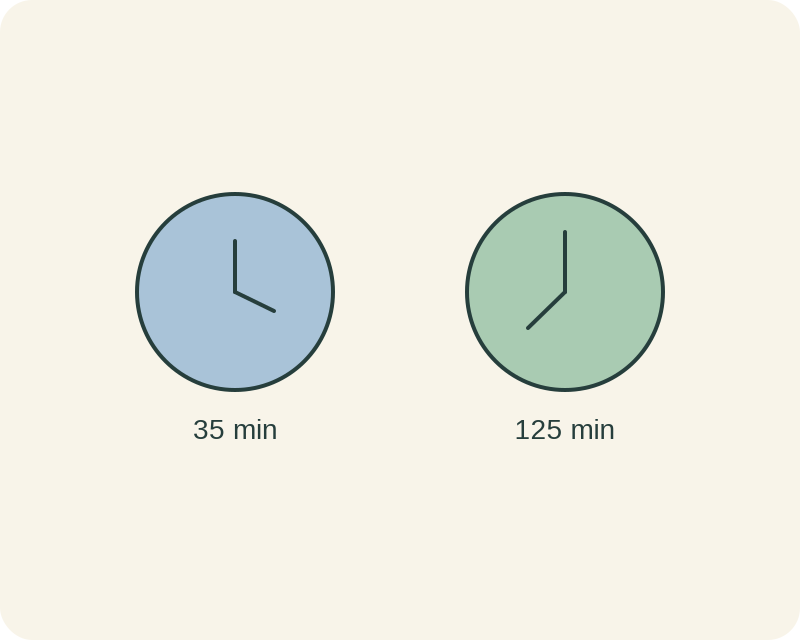
La primera respuesta suma 20 minutos del viernes y 15 del lunes. El total de atención es 35 minutos. La espera de calendario fue de 64 horas y 35 minutos.
Aplica la pausa que se haya acordado
Hasta la resolución transcurren 170 minutos dentro del horario. Si el acuerdo pausa ese reloj durante la espera documentada, quedan 125 minutos computables. Si cuenta toda la atención, conserva los 170. Escribe la regla junto al resultado para que la diferencia pueda revisarse.
Una pausa necesita un evento de entrada y otro de salida. Si falta uno, deja la medición pendiente y consulta el historial. Un estado visible por sí solo puede ocultar cuánto duró.
Deja claro cómo se mide una reapertura
Si el archivo vuelve a fallar, acuerda si se reabre la medición anterior o si comienza otra. Relaciona el evento nuevo con la solución original. Así la siguiente revisión puede encontrar ambos episodios y saber cómo se contaron.
Cuando la fecha de cierre representa una confirmación interna, identifica ese hecho. Si el acuerdo pide validación del cliente, busca también la evidencia de esa validación.
Conserva los tiempos junto al caso
Guarda canal, hora de entrada, primera respuesta, resolución, zona, horario, pausas y objetivo acordado. Recalcula una muestra con los eventos originales. La guía de impacto y urgencia ayuda a ordenar la cola. Estos dos relojes permiten revisar los tiempos de un caso bajo sus reglas de atención.
Two support clocks for first response and resolution
A person can receive help quickly and wait longer for a solution. Recording first response and resolution separately lets the team explain which timing target it met and where the wait accumulated.
Define both stopping events and publish the applicable calendar. Retain observed timestamps and each pause rule so the calculation can be reconstructed.
Agree which event stops each clock
In the example both clocks start when a valid request arrives. The first stops when a team member replies with a specific next step. The second stops when the agreed solution is confirmed. Decide in advance how to treat automatic acknowledgments and reopened cases.
Atlassian documents start, pause and stop conditions for service level measurements. Use those questions to describe your agreement and its supporting records.
Set the support calendar
The fictional case uses Monday to Friday, 09:00 to 17:00, in one time zone with no holidays in the interval. Record those conditions before calculating. If a channel has a different target, keep the calendar that applies to each request.
Calendar time counts the full wait. Support time counts minutes falling within the applicable hours. The agreement should state which applies to each commitment.
Follow a request from Friday to Monday
Someone reports at 16:40 Friday that a file will not download. Support replies at 09:15 Monday, asks for a detail at 09:30, receives it at 10:15 and confirms the solution at 11:30.
| Event | Time | Record |
|---|---|---|
| Received | Friday 16:40 | Both clocks start |
| First response | Monday 09:15 | First clock stops |
| Documented wait | Monday 09:30–10:15 | 45 minutes |
| Resolution | Monday 11:30 | Second clock stops |
The first response uses 20 minutes on Friday and 15 on Monday, or 35 support minutes. The calendar wait was 64 hours and 35 minutes.
Apply the pause agreed for the case
Resolution takes 170 minutes within the support schedule. If the agreement pauses this clock during the documented wait, 125 minutes count. If it counts all support time, keep 170. Record the rule with the result so the difference can be checked.
A pause needs an entry and exit event. If one is missing, keep the measurement pending and consult the history. A visible state alone can conceal its duration.
Define how a reopened request is measured
If the file fails again, agree whether the previous measurement resumes or another begins. Link the new event to the original resolution so a reviewer can find both episodes and understand the count.
If the closure timestamp is an internal confirmation, identify it as such. If the agreement requires customer validation, look for that evidence too.
Keep the times with the case
Retain channel, receipt time, first response, resolution, time zone, schedule, pauses and agreed target. Recalculate a sample from original events. The impact and urgency guide helps order the queue. These clocks help review case timing under the applicable support rules.
用两个客服时钟衡量首次回复与解决时间
客户可能很快得到回应,却需要继续等待解决。分开记录首次回复与解决时间,可以说明团队达到了哪项目标,也能看到等待发生在哪段。
定义两项停止事件,并公布适用的服务日历。保留实际时间和暂停规则,以便重建计算。
约定各时钟何时停止
示例中,有效请求进入时,两只时钟同时开始。团队成员回复并说明具体下一步时,第一只停止。约定的解决方案得到确认时,第二只停止。提前决定自动回执和重新打开的工单如何处理。
Atlassian 文档列出服务水平测量的开始、暂停和停止条件。可用这些问题描述协议及其支持记录。
确定服务日历
虚构案例采用周一至周五 09:00 至 17:00,同一时区,区间内没有假日。计算前先记录这些条件。若渠道目标不同,为每次请求保留适用日历。
自然时间计入全部等待。服务时长只累计落在适用服务时间内的分钟。协议应说明每项承诺使用哪个口径。
从周五追踪到周一
有人周五 16:40 报告文件无法下载。客服周一 09:15 回复,09:30 询问信息,10:15 收到,11:30 确认解决。
| 事件 | 时间 | 记录 |
|---|---|---|
| 收到请求 | 周五 16:40 | 两只时钟开始 |
| 首次回复 | 周一 09:15 | 第一只停止 |
| 有记录的等待 | 周一 09:30–10:15 | 45 分钟 |
| 解决 | 周一 11:30 | 第二只停止 |
首次回复耗用周五 20 分钟与周一 15 分钟,合计 35 个服务分钟。自然时间经过 64 小时 35 分钟。
使用双方约定的暂停规则
截至解决,服务时间共 170 分钟。如果约定等待期间暂停解决时钟,计入 125 分钟。如果计入全部服务时间,则为 170。把规则与结果并列,方便复核差异。
暂停需要进入和退出事件。缺少一项时保留待确认,查看历史。只看当前状态可能看不出持续多久。
定义重开后的测量
文件再次失败时,约定是恢复原测量还是启动新一轮。把新事件与原解决记录关联,让复盘可以查到两段经过及其计数方式。
若关闭时间是内部确认,应写明。如果协议要求客户验证,还需查找对应证据。
把时间与案例一起保存
保存渠道、进入时间、首次回复、解决、时区、日历、暂停与约定目标。抽查案例并用原事件复算。影响和紧急度指南帮助安排队列。本文的两个时钟用于按服务规则复核个案时长。
Fuentes y método
Fuentes consultadas el 4 de noviembre de 2026. Los escenarios y cifras ilustrativos son ficticios. Ejercicios y fichas originales, sin resultados de clientes ni observaciones de campo atribuidos. Editorial standards · Disclosures.