Lee la versión en texto de principio a fin. Comprueba fecha, condiciones, dirección de destino y pie antes de aprobarla.
Reúne la información que puede quedar en una imagen
Para el taller, conserva nombre, sábado 21 de noviembre, hora local, sede y necesidad de reservar. Si el cartel indica que hay que llevar un cuaderno, llévalo al texto. Agrupa los datos del mismo evento para que se puedan leer juntos.
Redacta la acción junto a su dirección
La maqueta puede decir «Reserva tu lugar para el taller de encuadernación» y mostrar en la línea siguiente libreria.example/taller. En la pieza real usa una dirección completa que abra la ficha correcta. Algunos clientes de correo convierten la dirección en enlace. La persona también debe poder reconocerla y copiarla.
Evita encerrar la única dirección útil en un párrafo largo. Separa con saltos los datos, la invitación y el pie.
Abre la versión que va a enviar la herramienta
Mailchimp documenta una versión en texto que genera para campañas HTML y que puede editarse desde su flujo de creación. Si usas otra plataforma, localiza la versión que prepara ese sistema. Revisa los campos personalizados con un contacto de prueba que tenga todos los datos y otro con campos opcionales vacíos.
Comprueba el correo de prueba
Usa el envío de prueba que tengas autorizado o inspecciona el mensaje de prueba. Si la dirección aparece reescrita para seguimiento, comprueba adónde llega. Revisa si el nombre del taller y sus condiciones coinciden con el correo y conserva los controles del pie, como la baja, en la forma que entrega la plataforma.
En el ejemplo, si la página de reserva cambió de sala, comprueba si ambas versiones del correo muestran la nueva sede. Cambiar solo la imagen puede dejar la versión en texto con datos anteriores.
Guarda una aprobación para las dos lecturas
Registra versión, fecha de prueba y destino abierto desde cada variante. Pide a otra persona que conteste dónde, cuándo y cómo reservar al leer solo el texto. Usa sus respuestas para identificar qué dato falta antes de dar por listo el correo.
The plain-text version of a brand email needs its own review
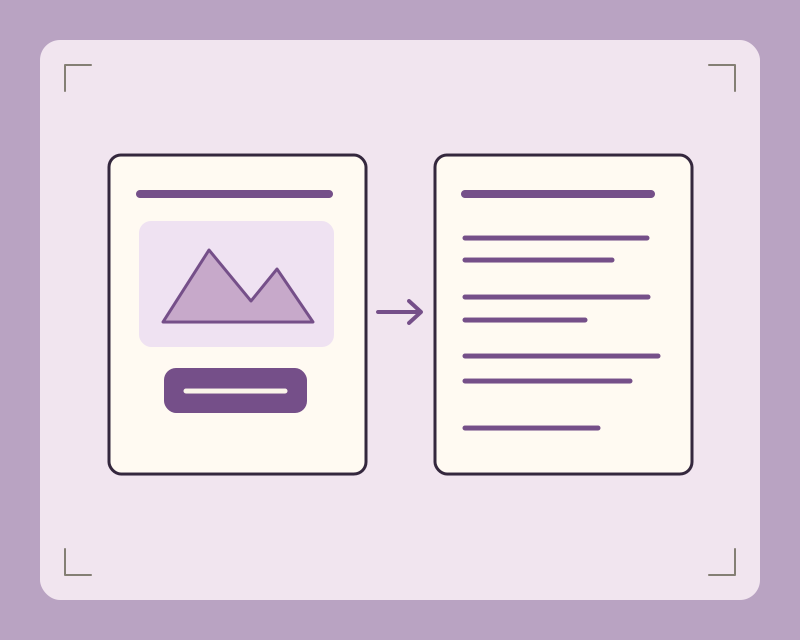
A fictional bookstore prepares an email about a workshop. In the designed version the date is inside a poster and the button says “Reserve your spot.” The plain-text version has to carry the same invitation using what it can display.
Read the plain-text version from beginning to end. Check the date, conditions, destination address and footer before approving it.
Collect details that might be inside an image
For the workshop keep its name, Saturday November 21, local time, venue and reservation requirement. If the poster says to bring a notebook, carry that into the text. Group the details of the event so readers can take them in together.
Write the action next to its address
The mock-up can say “Reserve your spot at the bookbinding workshop” and show libreria.example/taller on the next line. In the real message, use a complete address that opens the correct page. Some email clients turn addresses into links. Readers should also be able to recognize and copy the address.
Avoid burying the only useful address in a long paragraph. Use line breaks to separate the details, invitation and footer.
Open the version the tool will send
Mailchimp documents a plain-text version it generates for HTML campaigns and lets you edit in the campaign workflow. On another platform, find the version that system prepares. Check personalized fields with a test contact whose data is complete and another with empty optional fields.
Check the test message
Use an authorized test send or inspect the test message. If the address is rewritten for tracking, check where it leads. Make sure the workshop name and conditions match the email and keep footer controls, such as unsubscribe, in the form the platform delivers.
In the example, if the reservation page changes rooms, check that both email versions show the new venue. Updating only the image can leave older information in the plain-text version.
Keep one approval for both readings
Record the version, test date and destination opened from each variant. Ask another person where and when the workshop happens and how to book it using the text alone. Use their answers to find any missing detail before approving the message.
品牌邮件的纯文本版本也需要检查
一家虚构书店准备发邮件介绍一场工作坊。在有版式的版本里,日期写在海报中,按钮上写着“预留名额”。纯文本版本需要用自己能显示的方式传达同一份邀请。
从头到尾读一遍纯文本版本。批准之前核对日期、条件、目标网址和页脚。
收集可能藏在图片里的信息
保留工作坊名称、11 月 21 日星期六、当地时间、地点和预约要求。如果海报写了要带笔记本,也把这项要求写进文字。同一场活动的资料放在一起,便于连续阅读。
把行动提示写在网址旁边
样稿可以写“预约装订工作坊”,下一行放 libreria.example/taller。正式邮件使用能打开正确详情页的完整网址。有些邮件客户端会自动把地址变成链接,读者也应该能认出并复制它。
避免把唯一有用的网址埋在长段落里。用换行分开活动资料、邀请和页脚。
打开工具实际准备发送的版本
Mailchimp 的文档介绍了 HTML 营销邮件的纯文本版本,以及如何在创建流程中编辑它。如果使用其他平台,就找到那个系统准备的版本。用一位资料完整的测试联系人和一位选填项为空的测试联系人检查个性化字段。
检查测试邮件
使用已获授权的测试发送,或查看测试邮件。如果网址被改写用于追踪,核对它实际打开哪里。确认页面的活动名称和条件与邮件相符,同时保留平台交付的页脚操作,例如退订。
本例中,如果预约页改了教室,就核对两个邮件版本是否都显示新地点。只改图片,纯文本可能仍留着旧信息。
为两种阅读方式留一份审批记录
记录版本、测试日期,以及各版本打开的页面。请另一位只看文字的人回答在哪里、何时举行、怎样预约。根据回答找出遗漏,再批准邮件。
Fuentes y método
Fuentes consultadas el 12 de noviembre de 2026. Los casos y datos numéricos de los ejercicios son ficticios. Editorial standards · Disclosures.