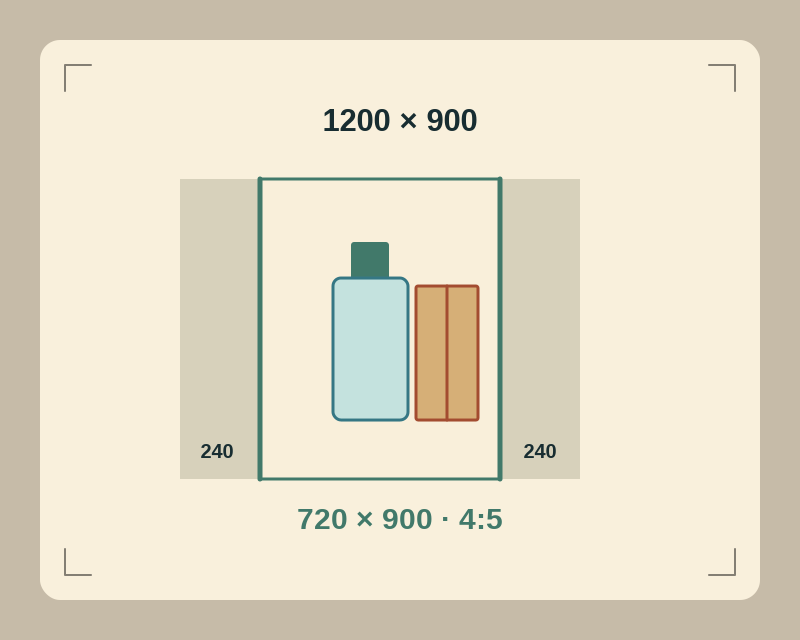
Define the aspect ratio, calculate the available window and review the excluded content before exporting.
Separate aspect ratio from dimensions
Aspect ratio expresses width relative to height. A 4:5 image has four units of width for every five of height: 720 × 900 and 1080 × 1350 share that shape, despite having different dimensions. Here, 4:5 is a fictional brief requirement, not a universal platform specification.
Cropping removes areas of the frame. Resizing changes image dimensions. Stretching width and height independently can distort the product; it does not solve a composition problem.
List the necessary elements
Before moving the window, identify the complete object that must appear, its relevant features and any embedded text that must remain readable. Separate these from dispensable background. If a label identifies a variant, do not treat it as decoration.
In the fictional campaign, the photograph contains a bottle and its box. The brief requires both to be visible, with room for a message. An attractive crop that removes the box fails that brief, even if the bottle stays centered.
Calculate the available crop
The original measures 1200 × 900 pixels, a 4:3 ratio. Keeping all 900 pixels of height, the width for 4:5 is 900 × 4 / 5 = 720. You must remove 480 pixels of width: a centered crop would remove 240 from each side.
The 720 × 900 window can move horizontally within the original. Its left edge can range from 0 to 480; moving it does not change its size. Check the bottle, box and message space at each position instead of assuming the center is always best.
Decide what to do when it will not fit
If no position preserves the necessary content, exporting more pixels will not solve the problem. Consider a new photograph or a layout with margins accommodating the complete image, if the design allows it.
Do not invent parts of the product to fill the frame or accept distorted perspective. In Photoshop, the crop tool allows a fixed aspect ratio; also inspect dimension and resolution fields so you understand the operation requested.
Review a copy at its intended size
Keep the original and save a copy with an identifiable ratio and version. Review the 720 × 900 output: product edges, lettering, message space and absence of distortion. Confirm the destination’s format and file-size requirements separately.
Deliver a short note: “4:5, window moved right, complete bottle and box.” This describes the crop decision and makes another ratio easier to produce without starting from an already cropped image.
Follow the evidence.
Sources checked November 22, 2026. The exercise scenarios and figures are fictional. Our editorial standards.