Open each edition URL with several preferences and no prior session. The chosen route should stay accessible even when the browser suggests another language.
Pick two URLs and a text marker
Use the full addresses of both editions. In this example the paths are /es/manual/ and /en/manual/. Copy one sentence from each edition's body that identifies it. Keep your network connection stable for the first test so language and location do not change together.
Change one signal at a time
Send a GET to each URL without cookies or an Accept-Language header. Repeat with es and en as the header values. In a browser, use clean profiles to distinguish a language preference from a saved choice. Keep the first response and the entire navigation chain in the network panel.
Read the results matrix
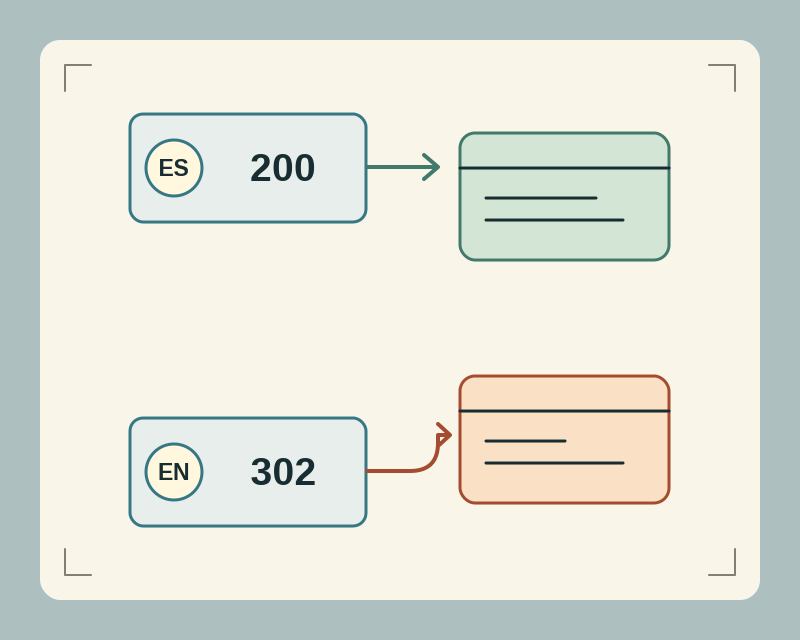
In the mock site, /es/manual/ returns 200 without the header and returns 302 to /en/ with en. That homepage returns 200, but the marker sentence is missing. If a request returns 200 at the original URL, read the body anyway: a server can also swap the text without redirecting.
Check the language switcher
Provide a visible link from each edition to the other. From the Spanish manual in the example it should lead to /en/manual/. Open both addresses again in separate sessions and check whether the preference forces a jump. Google recommends dedicated URLs for each edition and says that its crawler sends requests without Accept-Language.
Save a repeatable check
Record the date, requested URL, header or profile, first status, final destination and sentence found. Repeat after changing the language rule or CDN. Check indexing separately.
Follow the evidence.
- Google Search Central · How Google crawls locale-adaptive pages ↗
- Google Search Central · Managing multi-regional and multilingual sites ↗
Sources checked November 15, 2026. The exercise scenarios and figures are fictional. Our editorial standards.