Confirm the source profile before converting; assigning an interpretation is not the same as transforming colors for another destination.
Identify the required operation
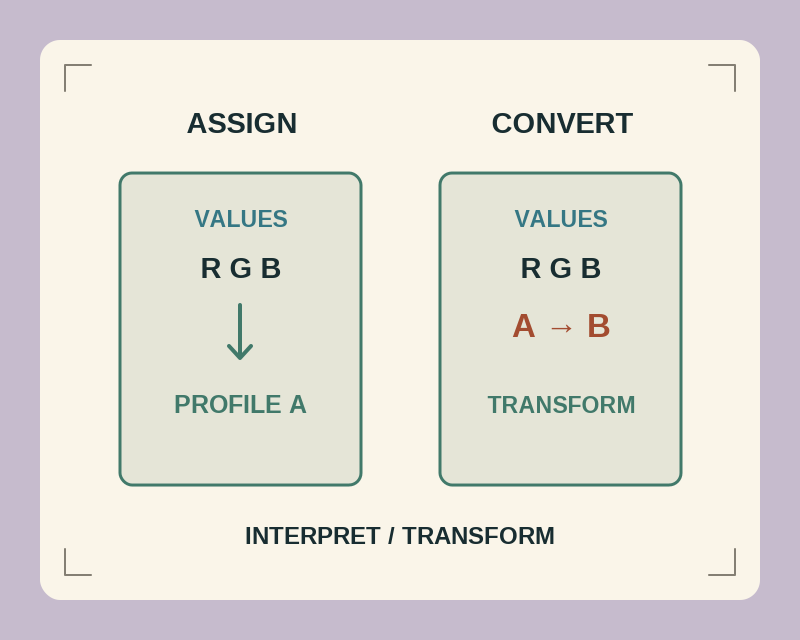
Adobe distinguishes two commands: assigning a profile preserves color values and changes their interpretation; conversion prepares colors for the destination profile’s space. In the first case, appearance can change even though values remain the same.
This guide reviews that decision in a campaign handoff. It establishes neither universal numerical equivalents between RGB and CMYK nor identical reproduction on every screen or paper. Identify the file and its destination before making changes.
Preserve the original and request missing information
In a fictional case, an agency receives product-photo.tif without an embedded profile. The email does not identify the working space. Keep the original and ask its producer which profile was used and whether a copy retaining that information exists.
An option making the product more attractive does not establish the correct profile. Mark the source as pending until confirmed. A reference screenshot can help discuss appearance but cannot replace the source file’s information.
Compare two paths using copies
Suppose the supplier confirms profile A and provides a verifiable reference. Assigning A to an untagged copy declares how to interpret its values. Document that confirmation rather than presenting a guess as a verified recovery.
For output requiring profile B, start with the correctly interpreted document and convert to B. The teaching comparison is: assignment, the same values with an interpretation; conversion, transformation toward a destination. Merely changing the label from A to B does not reproduce the second path.
Review the actual delivery file
In Photoshop, inspect the conversion preview and retain the options used. Adobe allows selection of a destination profile and options including rendering intent and black point compensation. Avoid a universal recipe without understanding the intended use.
Save in a format supporting embedded profiles and reopen the delivery file. Check profile, dimensions, name and appearance in the agreed workflow. Review that copy rather than only the document left open before exporting.
Leave a reproducible decision
The example record includes the received original, initially unknown source, supplier confirmation, profile A, destination B and final file. A note separates assignment on the copy from the subsequent conversion process.
If the printer, channel or specification changes, reopen the decision from the preserved original and confirm the new destination. Another person should be able to reconstruct what was interpreted and what was transformed without relying on one particular screen having looked right.
Follow the evidence.
Sources checked November 25, 2026. The exercise scenarios and figures are fictional. Our editorial standards.