Confirma el perfil de origen antes de convertir; asignar una interpretación no equivale a transformar los colores para otro destino.
Identifica qué operación necesitas
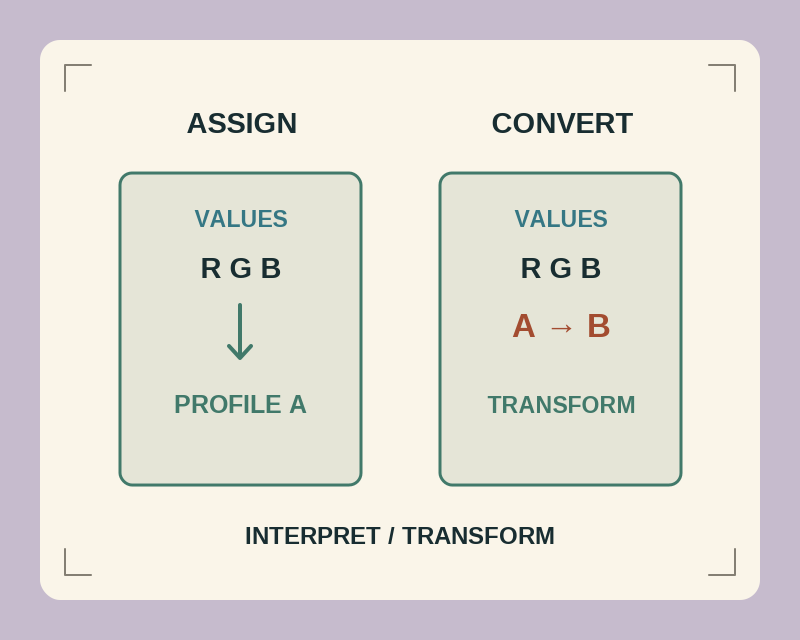
Adobe distingue dos comandos: asignar un perfil conserva los valores de color y cambia su interpretación; convertir prepara los colores para el espacio del perfil de destino. En el primer caso, el aspecto puede cambiar aunque los valores permanezcan iguales.
Esta guía revisa esa decisión en una entrega de campaña. No establece equivalencias numéricas universales entre RGB y CMYK ni promete una reproducción idéntica en cualquier pantalla o papel. El archivo y su destino deben quedar identificados antes de intervenir.
Conserva el original y pide el dato que falta
En un caso ficticio, una agencia recibe foto-producto.tif sin perfil incrustado. El correo no indica el espacio de trabajo. Guarda el original y pregunta a quien lo produjo qué perfil utilizó y si existe una copia con esa información.
Que una opción haga el producto más atractivo no demuestra que sea el perfil correcto. Marca el origen como pendiente mientras no puedas confirmarlo. Una captura de referencia puede ayudar a conversar sobre apariencia, pero no reemplaza el dato del archivo de origen.
Compara dos recorridos en copias
Supongamos que el proveedor confirma el perfil A y entrega una referencia verificable. En una copia sin perfil, asignar A sirve para declarar cómo interpretar sus valores. Documenta esa confirmación; no presentes una conjetura como recuperación comprobada.
Para una salida que exige el perfil B, parte del documento correctamente interpretado y utiliza la conversión a B. La comparación pedagógica es: asignación, mismos valores con una interpretación; conversión, transformación hacia un destino. Cambiar solo la etiqueta de A por B no reproduce ese segundo recorrido.
Revisa el archivo que realmente vas a entregar
En Photoshop, consulta la vista previa de la conversión y conserva las opciones utilizadas. Adobe permite seleccionar el perfil de destino y opciones como intención de reproducción y compensación de punto negro. No elijas una receta universal sin conocer el uso previsto.
Guarda en un formato que admita el perfil incrustado y vuelve a abrir el archivo de entrega. Comprueba perfil, dimensiones, nombre y apariencia en el flujo acordado. La revisión debe hacerse sobre esa copia, no solo sobre el documento que quedó abierto antes de exportar.
Deja una decisión reproducible
El registro del ejemplo incluye original recibido, origen inicialmente desconocido, confirmación del proveedor, perfil A, destino B y archivo final. Una nota separa la asignación realizada en la copia del proceso de conversión posterior.
Si cambia la imprenta, el canal o su especificación, reabre la decisión desde el original conservado y confirma el nuevo destino. El objetivo es que otra persona pueda reconstruir qué se interpretó y qué se transformó, sin depender de que una pantalla particular pareciera correcta.
Color profiles: assigning and converting solve different problems
A photograph changes appearance when opened, and someone suggests choosing profiles until it looks right. First identify whether information about its colors is missing or whether you need to prepare a different output.
Confirm the source profile before converting; assigning an interpretation is not the same as transforming colors for another destination.
Identify the required operation
Adobe distinguishes two commands: assigning a profile preserves color values and changes their interpretation; conversion prepares colors for the destination profile’s space. In the first case, appearance can change even though values remain the same.
This guide reviews that decision in a campaign handoff. It establishes neither universal numerical equivalents between RGB and CMYK nor identical reproduction on every screen or paper. Identify the file and its destination before making changes.
Preserve the original and request missing information
In a fictional case, an agency receives product-photo.tif without an embedded profile. The email does not identify the working space. Keep the original and ask its producer which profile was used and whether a copy retaining that information exists.
An option making the product more attractive does not establish the correct profile. Mark the source as pending until confirmed. A reference screenshot can help discuss appearance but cannot replace the source file’s information.
Compare two paths using copies
Suppose the supplier confirms profile A and provides a verifiable reference. Assigning A to an untagged copy declares how to interpret its values. Document that confirmation rather than presenting a guess as a verified recovery.
For output requiring profile B, start with the correctly interpreted document and convert to B. The teaching comparison is: assignment, the same values with an interpretation; conversion, transformation toward a destination. Merely changing the label from A to B does not reproduce the second path.
Review the actual delivery file
In Photoshop, inspect the conversion preview and retain the options used. Adobe allows selection of a destination profile and options including rendering intent and black point compensation. Avoid a universal recipe without understanding the intended use.
Save in a format supporting embedded profiles and reopen the delivery file. Check profile, dimensions, name and appearance in the agreed workflow. Review that copy rather than only the document left open before exporting.
Leave a reproducible decision
The example record includes the received original, initially unknown source, supplier confirmation, profile A, destination B and final file. A note separates assignment on the copy from the subsequent conversion process.
If the printer, channel or specification changes, reopen the decision from the preserved original and confirm the new destination. Another person should be able to reconstruct what was interpreted and what was transformed without relying on one particular screen having looked right.
色彩配置文件:指定与转换解决不同问题
照片打开后外观变了,有人建议不断更换配置文件,直到看起来合适。操作之前,先判断是缺少色彩信息,还是需要准备另一种输出。
转换前确认源配置文件;指定一种解释,不等于为另一目的地转换颜色。
确认需要哪种操作
Adobe 区分两个命令:指定配置文件保留颜色数值、改变其解释方式;转换则为目标配置文件的空间准备颜色。前一种操作中,数值不变,外观仍可能变化。
本指南讨论推广素材交付中的这项决定,不提供 RGB 与 CMYK 的通用数值对应,也不承诺所有屏幕或纸张显示完全一致。修改之前,应明确文件及其输出目的地。
保存原件并索取缺失信息
虚构案例中,代理机构收到 product-photo.tif,没有嵌入配置文件,邮件也未说明工作空间。先保存原件,再向制作者确认所用配置文件,以及是否有保留这些信息的副本。
某个选项让产品更好看,不能证明它就是正确配置。在确认之前,将来源标为待确认。参考截图可以辅助讨论外观,但不能代替源文件的色彩信息。
用副本比较两条路径
假设供应商确认使用配置文件 A,并提供了可核查的参考。为无配置副本指定 A,是声明如何解释其中的数值。记录确认依据,不要把猜测写成已验证的恢复。
若输出要求配置文件 B,应从已被正确解释的文档开始,执行到 B 的转换。教学上可以区分为:指定是为相同数值提供解释;转换是向目的地进行变换。仅把 A 的标签改成 B,不能重现第二条路径。
检查实际交付的文件
在 Photoshop 中查看转换预览,并保留使用的选项。Adobe 可选择目标配置文件,以及渲染意图、黑点补偿等选项。不了解用途时,不应套用统一配方。
保存为支持嵌入配置文件的格式,然后重新打开交付副本。在约定流程中核对配置、尺寸、名称和外观。检查对象是该副本,而不仅是导出前仍然打开的文档。
留下可复核的决定
案例记录包含收到的原件、最初未知的来源、供应商确认、配置文件 A、目标 B 和最终文件。另用一条说明区分副本上的指定操作与之后的转换。
如果印刷服务商、渠道或规格变化,从保存的原件重新审视决定,并确认新目的地。目标是让另一人能够还原哪些内容经过解释、哪些经过转换,而不是依赖某一块屏幕当时看起来合适。
Fuentes y método
Fuentes consultadas el 25 de noviembre de 2026. Los casos y datos numéricos de los ejercicios son ficticios. Editorial standards · Disclosures.