Save the uncompressed response, measure bytes and locate the content; a light transfer does not establish that the entire document fits within the limit.
Define the file under review
The Google documentation checked for this guide sets Googlebot’s limit at 2MB for supported non-PDF files and says it applies to uncompressed data. Its March explanation, corrected in October 2026, specifies that response headers count. This is not one combined budget for every resource on a page.
Our exercise uses an HTML page without extending its threshold to image or video crawlers. The documentation distinguishes those products and PDFs. Record the limit’s date and source: this technical condition can change.
Keep two clearly named sizes
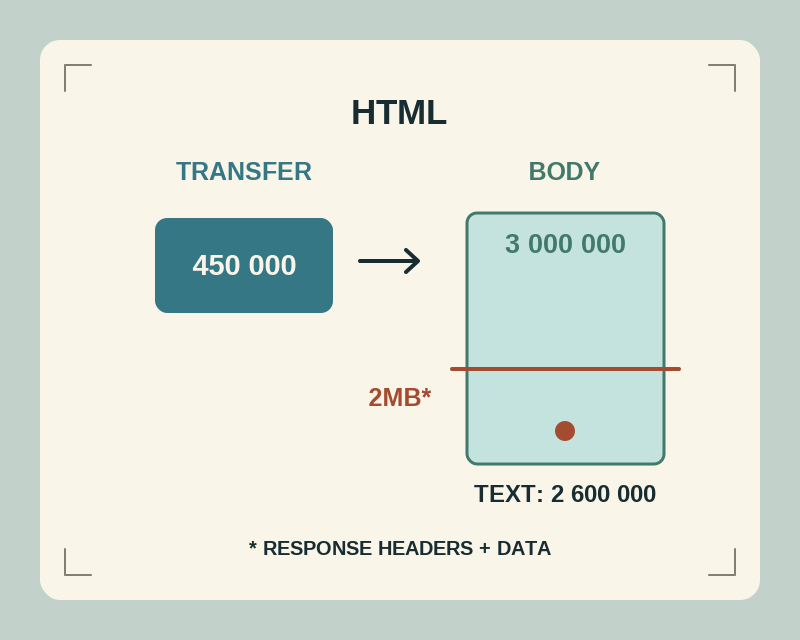
In a fictional case, the HTML body occupies 3,000,000 uncompressed bytes and transfers in 450,000 compressed bytes. Put both figures in separate columns. The second describes transport; it does not replace the first when reviewing this condition.
Save the exact decompressed body and response headers separately. Count bytes rather than characters: accented text and Chinese characters can take several bytes per character. Nor is the DOM’s node count a measurement of the received file.
Locate information in the response
The example team finds the main description after byte 2,600,000. A repeated menu and large inline blocks precede it. That identifies a specific problem even when the compressed transfer looks small.
Find the position by searching for a known phrase within the saved body’s bytes, not in the elements panel after JavaScript executes. If the text only appears after code runs, record that dependency separately; do not assign it a position in initial HTML that never contained it.
Remove excess and measure again
The exercise’s proposal removes menu repetition and moves reusable code into external files. The new body measures 600,000 bytes, with the description starting near byte 40,000. These are illustrative figures for two saved responses, not measurements from this site.
Google explains that referenced resources have separate per-URL fetching counters. Still, check that external files respond and content continues to work. Splitting files without checking references can exchange a size problem for an inaccessible resource.
Separate receipt, rendering and indexing
Google says the downloaded portion is processed when the limit is reached; the entire page is not automatically rejected. The useful question is therefore which information remained available. HTTP 200 alone does not answer it.
Keep URL, time, headers, body, sizes and positions before and after. Then verify rendering and URL inspection. Staying below the limit guarantees neither indexing nor ranking: this check only establishes the size and content location of the reviewed response.
Follow the evidence.
- Google: Googlebot and uncompressed file-size limits ↗
- Google: fetching limits and response headers, corrected October 29, 2026 ↗
Sources checked November 25, 2026. The exercise scenarios and figures are fictional. Our editorial standards.