Guarda la respuesta sin comprimir, mide bytes y localiza el contenido; una transferencia ligera no demuestra que todo el documento quede dentro del límite.
Delimita el archivo que estás revisando
La documentación de Google consultada para esta guía fija en 2MB el límite de Googlebot para archivos compatibles distintos de PDF y dice que se aplica a datos sin comprimir. Su explicación de marzo, corregida en octubre de 2026, aclara que incluye encabezados de respuesta. No es un presupuesto total de todos los recursos de una página.
Usaremos una página HTML como ejercicio, sin extender su umbral a los rastreadores de imágenes o video. La documentación distingue esos productos y los PDF. Registra fecha y fuente del límite: es una condición técnica que puede cambiar.
Conserva dos tamaños con nombres claros
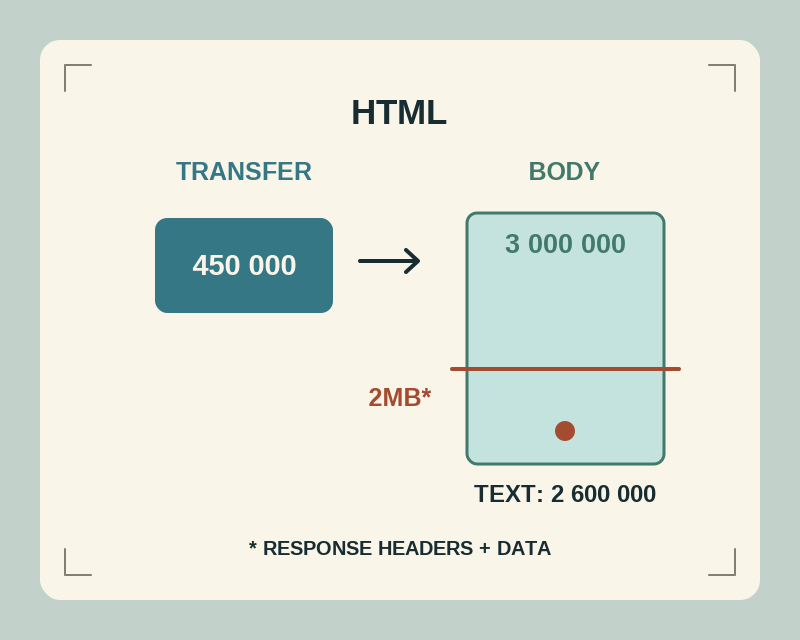
En un caso ficticio, el cuerpo HTML ocupa 3.000.000 de bytes sin comprimir y se transfiere comprimido en 450.000 bytes. Anota ambas cifras en columnas distintas. La segunda describe el transporte; no sustituye la primera al revisar esta condición.
Guarda el cuerpo exacto después de descomprimir y los encabezados de respuesta por separado. Cuenta bytes, no caracteres: el texto con acentos o caracteres chinos puede ocupar varios bytes por carácter. Tampoco uses el número de nodos del DOM como medida del archivo recibido.
Localiza la información dentro de la respuesta
El equipo del ejemplo encuentra la descripción principal después del byte 2.600.000. Antes hay un menú repetido y grandes bloques incrustados. Ese hallazgo señala un problema concreto aunque la transferencia comprimida parezca pequeña.
La posición se obtiene buscando una frase conocida en los bytes del cuerpo guardado, no en el panel de elementos después de ejecutar JavaScript. Si el texto solo aparece tras ejecutar código, registra esa dependencia aparte; no le atribuyas una posición en el HTML inicial donde no existe.
Reduce el exceso y vuelve a medir
La propuesta del ejercicio elimina repeticiones del menú y mueve código reutilizable a archivos externos. El nuevo cuerpo mide 600.000 bytes y la descripción empieza cerca del byte 40.000. Son cifras ilustrativas de dos respuestas conservadas, no un resultado medido en este sitio.
Google explica que los recursos referenciados se descargan con contadores por URL separados. Aun así, comprueba que los archivos externos respondan y que el contenido siga funcionando. Dividir archivos sin revisar sus referencias puede cambiar un exceso de tamaño por un recurso inaccesible.
Separa recepción, renderizado e indexación
Según Google, al alcanzar el límite se procesa la parte descargada; no se rechaza automáticamente toda la página. Por eso la pregunta útil es qué información quedó disponible. Un estado HTTP 200 no responde por sí solo esa pregunta.
Conserva URL, momento, encabezados, cuerpo, tamaños y posiciones antes y después. Después verifica el renderizado y la inspección de la URL. Estar por debajo del límite no garantiza indexación ni posición: este control solo demuestra el tamaño y la ubicación del contenido de la respuesta revisada.
HTML and Googlebot: measure bytes after decompression
A small compressed response can contain a much larger HTML document. To review a fetching limit, you need to know which size you measured and where the important information starts within the file.
Save the uncompressed response, measure bytes and locate the content; a light transfer does not establish that the entire document fits within the limit.
Define the file under review
The Google documentation checked for this guide sets Googlebot’s limit at 2MB for supported non-PDF files and says it applies to uncompressed data. Its March explanation, corrected in October 2026, specifies that response headers count. This is not one combined budget for every resource on a page.
Our exercise uses an HTML page without extending its threshold to image or video crawlers. The documentation distinguishes those products and PDFs. Record the limit’s date and source: this technical condition can change.
Keep two clearly named sizes
In a fictional case, the HTML body occupies 3,000,000 uncompressed bytes and transfers in 450,000 compressed bytes. Put both figures in separate columns. The second describes transport; it does not replace the first when reviewing this condition.
Save the exact decompressed body and response headers separately. Count bytes rather than characters: accented text and Chinese characters can take several bytes per character. Nor is the DOM’s node count a measurement of the received file.
Locate information in the response
The example team finds the main description after byte 2,600,000. A repeated menu and large inline blocks precede it. That identifies a specific problem even when the compressed transfer looks small.
Find the position by searching for a known phrase within the saved body’s bytes, not in the elements panel after JavaScript executes. If the text only appears after code runs, record that dependency separately; do not assign it a position in initial HTML that never contained it.
Remove excess and measure again
The exercise’s proposal removes menu repetition and moves reusable code into external files. The new body measures 600,000 bytes, with the description starting near byte 40,000. These are illustrative figures for two saved responses, not measurements from this site.
Google explains that referenced resources have separate per-URL fetching counters. Still, check that external files respond and content continues to work. Splitting files without checking references can exchange a size problem for an inaccessible resource.
Separate receipt, rendering and indexing
Google says the downloaded portion is processed when the limit is reached; the entire page is not automatically rejected. The useful question is therefore which information remained available. HTTP 200 alone does not answer it.
Keep URL, time, headers, body, sizes and positions before and after. Then verify rendering and URL inspection. Staying below the limit guarantees neither indexing nor ranking: this check only establishes the size and content location of the reviewed response.
HTML 与 Googlebot:测量解压后的字节数
压缩后很小的响应,可能包含大得多的 HTML 文档。核查抓取上限前,需要明确测量的是哪种大小,以及重要信息在文件中从哪里开始。
保存解压后的响应,按字节测量并定位内容;传输量小,不能证明整个文档都在上限以内。
明确核查的文件
本指南核对的 Google 文档将 Googlebot 对受支持非 PDF 文件的上限定为 2MB,并说明按未压缩数据计算。三月的说明在 2026 年十月更正后明确:响应头也计入上限。这不是整页所有资源共享的总预算。
练习采用一份 HTML 页面,不把同一阈值套用到图片或视频抓取工具。文档对这些产品和 PDF 另作区分。记录上限的核对日期与来源,因为技术条件可能变化。
分列保存两种大小
虚构案例的 HTML 正文未压缩时为 3,000,000 字节,压缩传输时为 450,000 字节。分成两列保存。后者描述传输,核查这一条件时不能代替前者。
分别保存解压后的原始正文和响应头。统计字节而不是字符:带重音的文字或汉字,一个字符可能占多个字节。DOM 节点数量也不能代表收到的文件大小。
在响应中定位信息
案例团队发现,主要描述位于第 2,600,000 字节之后,前面是重复菜单和大段内嵌内容。即使压缩传输看起来很小,这也指出了具体问题。
应在保存的正文字节中搜索已知短语来确定位置,而不是查看执行 JavaScript 后的元素面板。如果文字只有执行代码后才出现,另记这项依赖;不能给它编造一个初始 HTML 中并不存在的位置。
减少冗余后重新测量
练习方案删除重复菜单,并把可复用代码移到外部文件。新正文为 600,000 字节,描述约从第 40,000 字节开始。这是两份保存响应的示例数字,不是本网站的实测结果。
Google 说明,被引用资源按各自 URL 分别计算抓取字节。不过仍应检查外部文件能否访问、内容能否正常工作。只拆分文件却不核对引用,可能把体积问题换成资源无法访问的问题。
区分接收、渲染与收录
Google 表示,达到上限后会处理已下载部分,并不会自动拒绝整页。因此有用的问题是哪些信息仍然可用。仅有 HTTP 200 不能回答这一点。
保留变更前后的 URL、时间、响应头、正文、大小与内容位置,再核查渲染及 URL 检查结果。低于上限不保证收录或排名;这项检查只证明所核查响应的大小和内容位置。
Fuentes y método
- Google: Googlebot and uncompressed file-size limits ↗
- Google: fetching limits and response headers, corrected October 29, 2026 ↗
Fuentes consultadas el 25 de noviembre de 2026. Los casos y datos numéricos de los ejercicios son ficticios. Editorial standards · Disclosures.