Revisa una celda cruzando su encabezado de fila con el de columna. Conserva el nombre de la tabla, la unidad y la relación en el HTML publicado.
Define qué pregunta responde cada eje
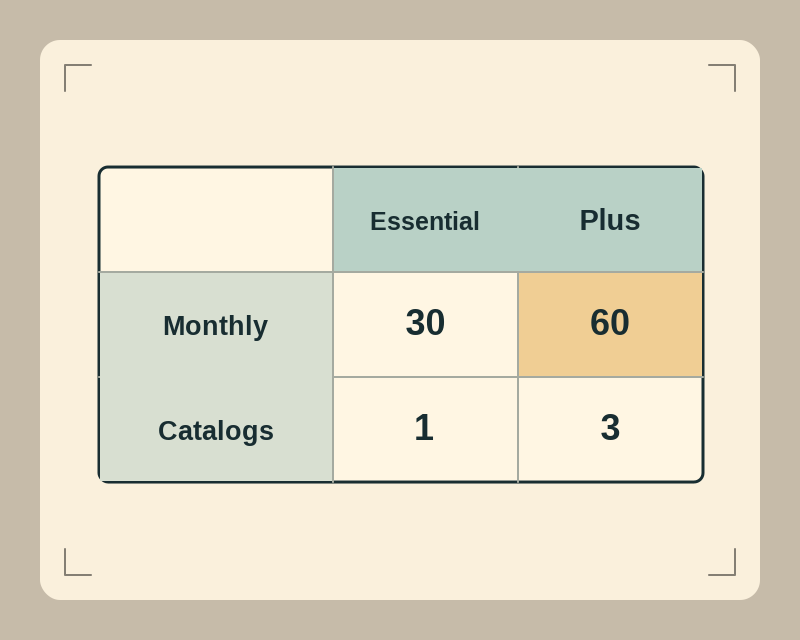
En el ejemplo, las columnas son Esencial y Plus; las filas son Mensualidad y Catálogos incluidos. Los importes están en unidades monetarias por mes y los catálogos son cantidades mensuales. Mantén esa diferencia visible. Un título breve mediante caption identifica el conjunto como «Comparación ficticia de planes».
Marca encabezados y datos por su función
En una tabla HTML sencilla con encabezados arriba y a la izquierda, usa th scope="col" para Esencial y Plus, y th scope="row" para Mensualidad y Catálogos incluidos. Los valores van en td. W3C explica cómo scope asocia los encabezados con sus celdas. Poner un td en negritas cambia su aspecto, pero no lo convierte en th.
Reconstruye la celda de 60
Esencial cuesta 30 al mes e incluye un catálogo; Plus cuesta 60 e incluye tres. La celda 60 responde a Mensualidad y Plus. La celda 3 responde a Catálogos incluidos y Plus. Esta es una muestra de estructura, sin una oferta comercial detrás. Conserva el mismo criterio cuando cambien los importes.
| Dato | Esencial | Plus |
|---|---|---|
| Mensualidad | 30 | 60 |
| Catálogos incluidos al mes | 1 | 3 |
Prueba la lectura publicada
Usa la navegación de tablas de un lector de pantalla y comprueba qué encabezados anuncia al llegar a 60 y a 3. Anota lector, navegador y versión. Revisa también una pantalla estrecha: si aparece desplazamiento horizontal, debe poder recorrerse sin perder acceso al resto de la página. La inspección del HTML y la prueba de lectura aportan evidencias complementarias.
Conserva la relación al rediseñar
Si el diseño móvil transforma filas en tarjetas, revisa que siga quedando claro a qué plan y concepto pertenece cada valor, tanto visualmente como con tecnología de apoyo. Las celdas combinadas y los encabezados de varios niveles requieren otro análisis. Para esta tabla sencilla, guarda una captura, el marcado y el resultado observado como referencia para la siguiente edición.
A pricing table needs headers that travel with every figure
A fictional page compares two plans. The number 60 appears under Plus, but assistive technology navigation also needs to retain what it measures: a monthly fee, included units or another condition. The figure's size does not establish those relationships.
Review one cell against both its row and column headers. Preserve the table name, unit and relationship in the published HTML.
Define the question each axis answers
In the example, the columns are Essential and Plus; the rows are Monthly fee and Included catalogs. Amounts are in currency units per month, and catalogs are monthly quantities. Keep that distinction visible. A short caption identifies the whole as “Fictional plan comparison.”
Mark headers and data by their roles
In a simple HTML table with headers across the top and down the left, use th scope="col" for Essential and Plus, and th scope="row" for Monthly fee and Included catalogs. Values belong in td. W3C explains how scope associates headers with their cells. Making a td bold changes its appearance, but does not turn it into a th.
Reconstruct the cell containing 60
Essential costs 30 per month and includes one catalog; Plus costs 60 and includes three. The 60 cell answers Monthly fee and Plus. The 3 cell answers Included catalogs and Plus. This is a structural example with no commercial offer behind it. Retain the same rule when amounts change.
| Measure | Essential | Plus |
|---|---|---|
| Monthly fee | 30 | 60 |
| Included catalogs per month | 1 | 3 |
Test the published reading experience
Use a screen reader's table navigation and check which headers it announces at 60 and 3. Record the reader, browser and version. Also inspect a narrow screen: if horizontal scrolling appears, the table should remain navigable without losing access to the rest of the page. HTML inspection and a reading test provide complementary evidence.
Preserve relationships during redesign
If a mobile layout turns rows into cards, check that each value still clearly belongs to its plan and measure, visually and through assistive technology. Merged cells and multilevel headers need a different analysis. For this simple table, keep a screenshot, the markup and the observed result as a reference for the next edition.
价格表中的每个数字都需要关联表头
虚构页面比较两个方案,60 显示在 Plus 下方。但使用辅助技术逐格浏览时,还要知道它代表月费、包含数量还是其他条件。数字的大小不能建立这些关系。
把一个单元格同时与行表头和列表头对照,并在发布的 HTML 中保留表名、单位及关联。
定义每个方向回答的问题
示例的列是基础版和 Plus,行是月费和包含的目录数。金额单位是每月货币单位,目录数也是每月数量。保留这个区别。可用简短的 caption 将整表命名为“虚构方案比较”。
按功能标记表头和数据
对于顶部和左侧都有表头的简单 HTML 表格,基础版和 Plus 使用 th scope="col",月费和包含的目录数使用 th scope="row",数值放入 td。W3C 说明了 scope 如何关联表头与数据格。把 td 加粗只改变外观,不会把它变成 th。
重建数值为 60 的单元格
基础版每月 30,包含一个目录;Plus 每月 60,包含三个。60 对应月费与 Plus,3 对应包含的目录数与 Plus。这只是结构示例,没有真实商业报价。金额改变时仍需保留相同关系。
| 指标 | 基础版 | Plus |
|---|---|---|
| 月费 | 30 | 60 |
| 每月包含的目录数 | 1 | 3 |
测试已发布的阅读体验
用屏幕阅读器的表格导航,检查到达 60 和 3 时会播报哪些表头。记录阅读器、浏览器及版本。还要检查窄屏:如果出现横向滚动,应能浏览表格并继续访问页面其他内容。检查 HTML 与实际阅读测试能提供相互补充的证据。
改版时保留关联
移动布局若把行变成卡片,应再次确认每个值在视觉和辅助技术中都能对应到方案及指标。合并单元格和多级表头需要另行分析。对这个简单表格,可保存截图、标记和观察结果,供下一版对照。
Fuentes y método
Fuentes consultadas el 20 de noviembre de 2026. Los casos y datos numéricos de los ejercicios son ficticios. Editorial standards · Disclosures.