Alinea primero los importes con una regla común. Después verifica que la fuente dibuje los dígitos con anchos iguales donde el diseño necesita compararlos.
Prepara una muestra que revele el problema
Usa tres precios con los mismos decimales y el mismo separador. En esa misma columna, añade 105,00 para ver cómo se lee una cifra con un dígito adicional. Coloca la moneda en un encabezado claro o repítela de manera uniforme.
Compara los dos tipos de cifra
Las cifras proporcionales pueden ocupar anchos distintos. En las cifras tabulares cada dígito avanza el mismo ancho. En una fuente que lo admita, activa la función OpenType tnum o usa font-variant-numeric: tabular-nums en la columna web. Prueba con la fuente que se usa realmente.
Alinea los importes por su referencia
Como todos los precios del ejercicio llevan coma y dos decimales, alinear a la derecha hace coincidir las comas cuando la fuente y el estilo son los mismos. Si mezclas formatos, reserva una posición decimal con las funciones del programa de maquetación. Evita ajustar filas a mano añadiendo espacios.
Revisa el soporte donde se va a leer
Abre el PDF final a tamaño real o el menú web en un teléfono. Verifica que 11,00 y 88,00 ocupen lo mismo y que 105,00 conserve la referencia decimal. Si la fuente no ofrece cifras tabulares, ensaya otra opción autorizada para los importes y vuelve a revisar el contraste con los nombres.
Conserva una muestra para la siguiente edición
Guarda la tipografía, su estilo, el ajuste numérico y tres precios de prueba. Si alguien edita el menú, comprueba el primer precio que incluya más dígitos o se parta en una línea estrecha.
Tabular numerals for a price column that's easy to scan
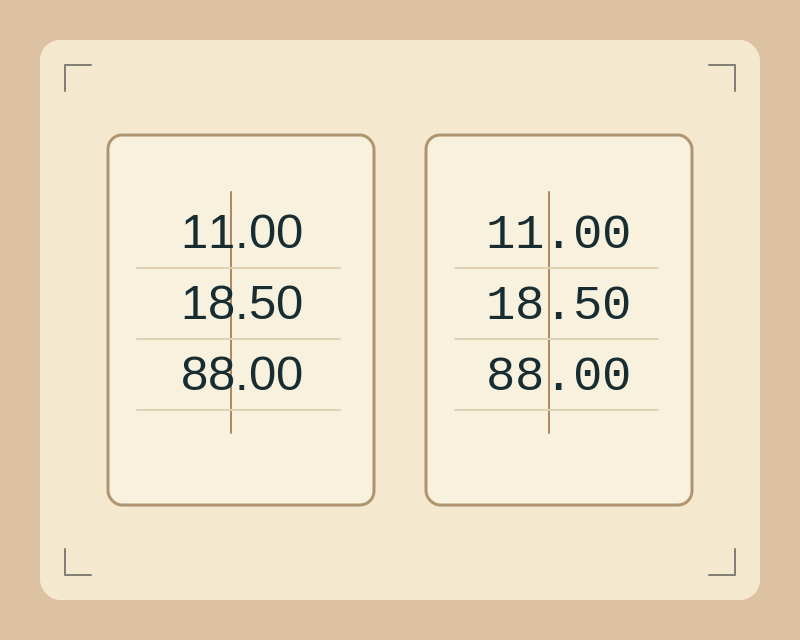
A fictional café prints a menu with 11.00, 18.50 and 88.00 in the same column. The prices have the same number of characters but appear to be different lengths. In the chosen typeface a one is narrower than an eight.
Give the prices a common alignment first. Then check that the font draws its digits at equal widths where the design calls for comparison.
Prepare a sample that exposes the problem
Use three prices with the same number of decimal places and the same separator. In the same column add 105.00 to see what happens with an extra digit. Put the currency in a clear heading or repeat it consistently.
Compare both numeral styles
Proportional numerals can have different widths. With tabular numerals, every digit advances by the same amount. For a font that supports it, enable the OpenType tnum feature or use font-variant-numeric: tabular-nums in the web column. Test the font actually used in the output.
Align prices to a common reference
All prices in this exercise use a decimal point and two places, so right alignment lines up the decimal points with the same font and style. If formats vary, set a decimal alignment with the layout program's tools. Avoid spacing each row by hand.
Check in the medium people will read
Open the final PDF at actual size or load the web menu on a phone. Verify that 11.00 and 88.00 take up the same width and that 105.00 keeps the same decimal reference. If the font lacks tabular numerals, try another approved option for the amounts and see how it reads alongside the item names.
Keep a sample for the next edition
Save the typeface, style, numeral setting and three test prices. When someone edits the menu, check the first price with extra digits or a wrap on a narrow line.
用等宽数字排出便于扫读的价格栏
一家虚构咖啡馆把 11.00、18.50 和 88.00 印在同一栏。价格的字符数相同,却看起来长短不一。所用字体的数字 1 比 8 窄。
先为价格设定统一的对齐基准。需要逐行比较时,再确认字体里的数字具有相同的前进宽度。
准备一组能显出问题的价格
选三个小数位数及分隔符相同的价格。在同一栏加上 105.00,看看多一位整数时是否好读。把币种写进清楚的栏标题,或在每行用同样方式标注。
比较两类数字
比例数字的宽度可以各不相同。等宽数字每一位占用的前进宽度相同。如果字体支持,就为价格栏启用 OpenType 的 tnum 功能,或在网页栏中使用 font-variant-numeric: tabular-nums。用成品实际采用的字体测试。
把价格对齐到同一参照
本练习的价格都含小数点和两位小数,字体和字样相同时,右对齐能让小数点落在同一列。如果金额格式不一,用排版软件的小数点对齐功能。别用手动添加空格来调整每一行。
在实际阅读媒介上核对
按实际尺寸查看最终 PDF,或用手机打开网页菜单。确认 11.00 和 88.00 同宽,并检查 105.00 的小数点仍在同一列。如果字体没有等宽数字,为金额试用另一款获准字体,再看它与品名搭配是否好读。
为下次改版保留样张
保存字体、字样、数字设置和三个测试价格。菜单更新后,检查最先出现的位数增加或在窄行中折行的价格。
Fuentes y método
Fuentes consultadas el 16 de noviembre de 2026. Los casos y datos numéricos de los ejercicios son ficticios. Editorial standards · Disclosures.