Copy the full property definition and compare it with the URL you want to review. A short matrix reveals differences in protocol, host and path.
Write down the two property boundaries
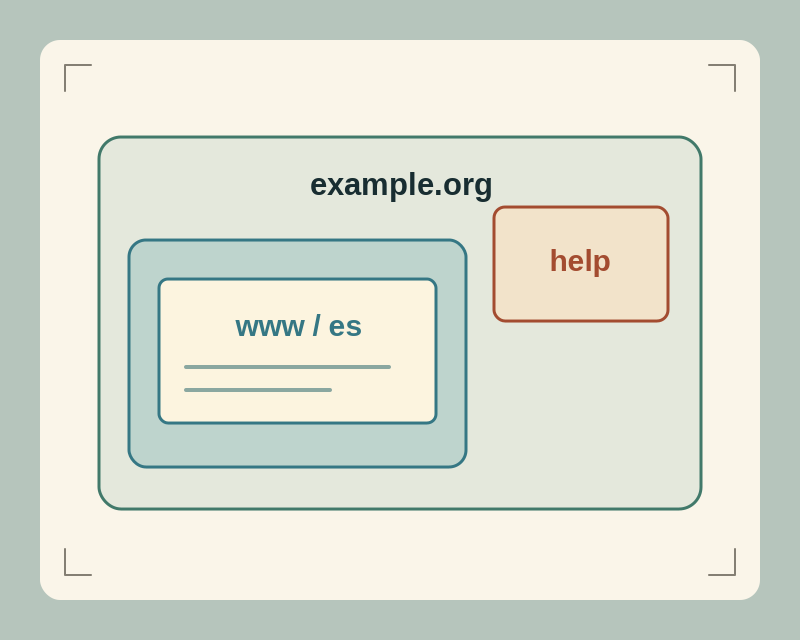
The Domain property example.org includes its subdomains, protocols and paths. The prefix https://www.example.org/es/ covers addresses starting with that prefix. The trailing slash makes the intended path clear. A Domain property is defined without a protocol or an internal path.
Test four addresses
https://www.example.org/es/guia/ belongs in both. https://www.example.org/en/guide/ belongs in the domain and falls outside the Spanish prefix. So does http://www.example.org/es/guia/ because of its protocol, and https://ayuda.example.org/es/guia/ because of its host.
Check which URL you are following
If an old address redirects, also record the final destination and which properties contain it. Keep the requested URL and the one you want to investigate separately. For search results, also check how Google attributes data to its selected canonical.
Read the report with the property in view
Before exporting, record the property, dates, search type, dimensions and filters. To focus on a path within the domain, check a page filter or a suitable URL-prefix property. Avoid adding overlapping views as though they were independent sets.
Repeat a controlled comparison
Choose one URL covered by both properties and use the same period and settings. If results differ, inspect filters, attribution and data availability before explaining the difference through site behavior. If you lack access to the needed property, request appropriate permission from its owner.
Follow the evidence.
Sources checked November 19, 2026. The exercise scenarios and figures are fictional. Our editorial standards.