Copia la definición completa de la propiedad y compárala con la URL que quieres revisar. Una matriz breve permite encontrar diferencias de protocolo, host y ruta.
Escribe el alcance de las dos propiedades
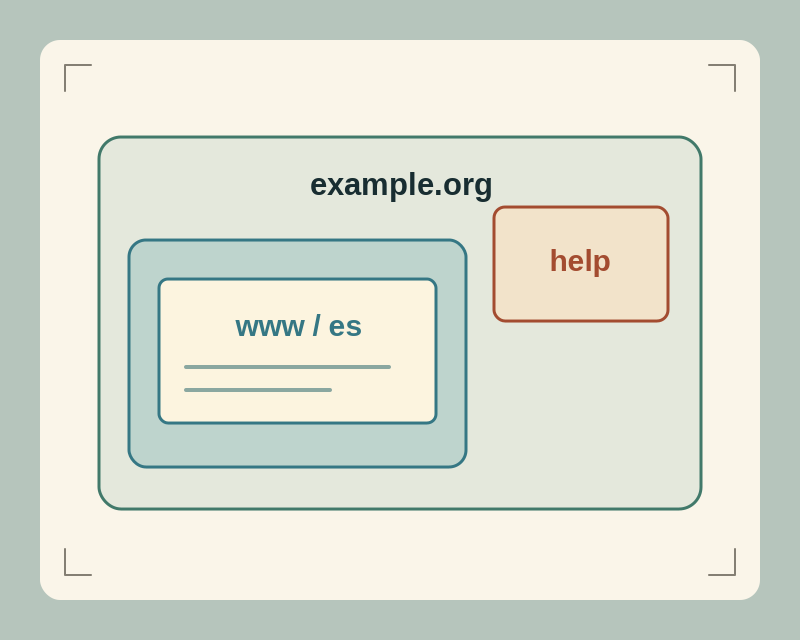
La propiedad de dominio example.org incluye sus subdominios, protocolos y rutas. El prefijo https://www.example.org/es/ cubre las direcciones que empiezan por ese prefijo. La barra final ayuda a dejar clara la ruta elegida. Una propiedad de dominio se define sin protocolo ni una ruta interna.
Ensaya cuatro direcciones
https://www.example.org/es/guia/ entra en ambas. https://www.example.org/en/guide/ entra en el dominio y queda fuera del prefijo español. Lo mismo ocurre con http://www.example.org/es/guia/ por su protocolo, y con https://ayuda.example.org/es/guia/ por su host.
Comprueba qué URL estás siguiendo
Si una dirección antigua redirige, anota también el destino final y en cuál de las propiedades cabe. Conserva por separado la URL que recibió la visita y la que quieres investigar. Para resultados de búsqueda, revisa además cómo atribuye Google los datos a la canonical que selecciona.
Lee el informe con la propiedad visible
Antes de exportar, registra propiedad, fechas, tipo de búsqueda, dimensiones y filtros. Si necesitas concentrarte en una ruta dentro del dominio, comprueba un filtro de página o una propiedad de prefijo adecuada. Evita sumar dos vistas superpuestas como si fueran conjuntos independientes.
Repite una comparación controlada
Elige una URL que entre en ambas propiedades y usa el mismo periodo y configuración. Si los resultados difieren, revisa filtros, atribución y disponibilidad de datos antes de explicarlo por el sitio. Si falta acceso a la propiedad necesaria, solicita a su propietario el permiso correspondiente.
Domain or URL prefix: check what belongs in your Search Console property
A team opens a Search Console property starting with https://www.example.org/es/. It looks for a help page on another subdomain and finds no data there. First it needs to check whether the selected property contains that address.
Copy the full property definition and compare it with the URL you want to review. A short matrix reveals differences in protocol, host and path.
Write down the two property boundaries
The Domain property example.org includes its subdomains, protocols and paths. The prefix https://www.example.org/es/ covers addresses starting with that prefix. The trailing slash makes the intended path clear. A Domain property is defined without a protocol or an internal path.
Test four addresses
https://www.example.org/es/guia/ belongs in both. https://www.example.org/en/guide/ belongs in the domain and falls outside the Spanish prefix. So does http://www.example.org/es/guia/ because of its protocol, and https://ayuda.example.org/es/guia/ because of its host.
Check which URL you are following
If an old address redirects, also record the final destination and which properties contain it. Keep the requested URL and the one you want to investigate separately. For search results, also check how Google attributes data to its selected canonical.
Read the report with the property in view
Before exporting, record the property, dates, search type, dimensions and filters. To focus on a path within the domain, check a page filter or a suitable URL-prefix property. Avoid adding overlapping views as though they were independent sets.
Repeat a controlled comparison
Choose one URL covered by both properties and use the same period and settings. If results differ, inspect filters, attribution and data availability before explaining the difference through site behavior. If you lack access to the needed property, request appropriate permission from its owner.
域名还是 URL 前缀:先核对 Search Console 资源包含哪些地址
团队打开以 https://www.example.org/es/ 开头的 Search Console 资源,想查另一个子域名上的帮助页,却在这里看不到数据。首先要确认当前资源是否包含那个地址。
复制完整的资源定义,与待查 URL 对照。用一张小矩阵就能找出协议、主机名和路径的差别。
写下两种资源的范围
域名资源 example.org 包含其子域名、协议和路径。前缀 https://www.example.org/es/ 覆盖以该前缀开头的地址。末尾斜杠有助于明确所选路径。域名资源的定义中不写协议或内部路径。
测试四个地址
https://www.example.org/es/guia/ 属于两者。https://www.example.org/en/guide/ 属于域名资源,却不属于西语前缀。http://www.example.org/es/guia/ 因协议不同而在前缀外,https://ayuda.example.org/es/guia/ 则因主机名不同而在前缀外。
核对正在跟踪哪个 URL
旧地址发生重定向时,同时记下最终目标及其归属。保留最初请求的地址和待调查的地址。查看搜索结果时,还要核对 Google 如何把数据归给其选择的规范网址。
阅读报告时保留资源信息
导出前记录资源、日期、搜索类型、维度和筛选条件。想聚焦域名内某条路径时,检查页面筛选器或合适的前缀资源。两个范围重叠的视图不宜直接当作独立集合相加。
做一次条件一致的比较
选一个两种资源都包含的 URL,使用相同期间与设置。如果结果不同,先检查筛选、归属和数据可用性,再用站点行为解释差异。如果没有所需资源的访问权限,向所有者申请相应权限。
Fuentes y método
Fuentes consultadas el 19 de noviembre de 2026. Los casos y datos numéricos de los ejercicios son ficticios. Editorial standards · Disclosures.