Pon el destino en palabras junto al código. Conserva una dirección legible y comprueba los dos caminos en una copia impresa.
Escribe qué se abrirá
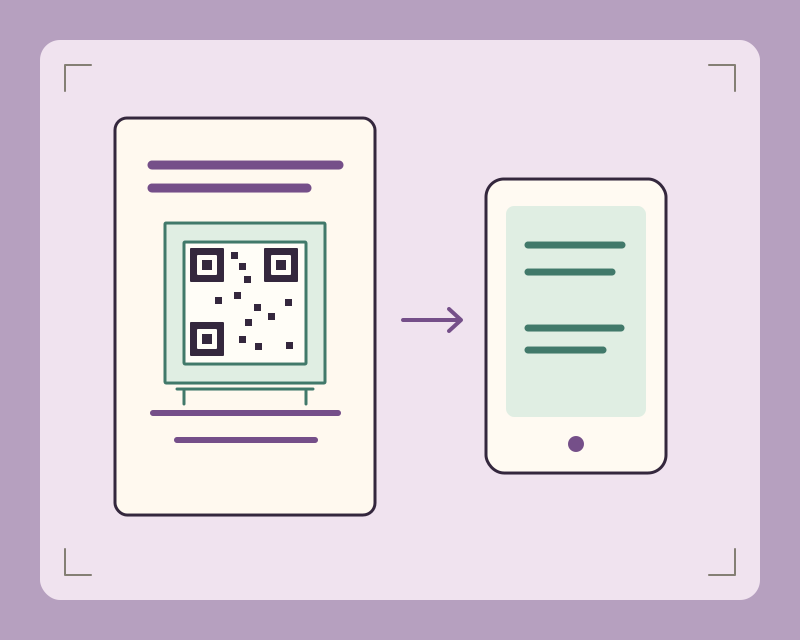
Usa una frase como «Consulta horarios y cómo llegar». Nombra la tarea que la persona puede completar en la página. Si cambias el destino a una reserva, revisa también la invitación. En el ejemplo, el primer contenido de la página responde con horarios y accesos.
Coloca una dirección corta cerca del símbolo. Para una maqueta se puede usar museo.example/visita. En una pieza real comprueba que la dirección impresa abre el destino previsto y se puede escribir a partir de lo que se ve.
Reserva un espacio para el margen
DENSO WAVE explica que el QR estándar necesita un margen claro de cuatro módulos por cada lado. Un módulo es una celda del patrón. Si el símbolo del ejemplo tiene 29 módulos de lado y cada módulo mide 0,5 mm, reserva 37 módulos de lado con margen, es decir 18,5 mm.
Esa cuenta explica el espacio de la maqueta. El tamaño que funciona para un cartel depende de la distancia de lectura, la impresión y el lugar. Mantén fotos, bordes y textos fuera del margen.
Prueba la impresión donde se usará
Imprime una copia al tamaño final. Pruébala con dos teléfonos, desde una posición razonable para quien pasa, con la luz disponible. Si el cartel tendrá una mica brillante, ensaya también con ella. Anota dónde dejó de leerse y qué cambiaste antes de reimprimir.
Comprueba el destino tras abrirlo
Lee la pantalla desde el principio. Revisa la dirección final, la primera información visible y si hace falta un inicio de sesión inesperado. Pide a otra persona que pruebe escribir la dirección breve. Registra por separado qué abrió el escaneo y qué abrió la dirección.
Deja una ficha para la próxima tirada
Guarda versión del cartel, fecha de prueba, archivo del código, dirección impresa y destino final. Si la página cambia de ubicación, comprueba ambos recorridos antes de reemplazar el cartel. Conserva una copia de prueba para verificar la legibilidad del tamaño real.
A poster that explains its QR destination and gives another way there
A fictional museum will place a poster on the street. It wants visitors to check opening hours and access before they arrive. A code is one way to open that information, and the poster also needs to work for someone who prefers typing an address.
Describe the destination in words beside the code. Keep a readable address and test both routes on a printed copy.
Say what will open
Use wording such as “Check opening hours and directions.” Name the task someone can complete on the page. If you change the destination to a reservation, review the invitation too. In the example, the first page content answers questions about hours and access.
Put a short address near the symbol. A mock-up can use museo.example/visita. On a real poster, check that the printed address opens the intended destination and can be typed from what the reader sees.
Leave room for the margin
DENSO WAVE explains that a standard QR Code needs a clear margin of four modules on each side. A module is one cell in the pattern. If the example symbol is 29 modules across and each module is 0.5 mm, reserve a square of 37 modules including the margin, or 18.5 mm across.
This calculation explains the space in the mock-up. A working poster size depends on reading distance, printing and placement. Keep photos, borders and text out of the margin.
Test the print where it will be used
Print a copy at final size. Try it with two phones from a position that makes sense for a passerby, under the available light. If the poster will have a glossy cover, test with the cover in place too. Record where scanning stopped working and what you changed before printing again.
Check the destination after opening it
Read the screen from the start. Check the final address, the first visible information and whether an unexpected sign-in is required. Ask someone else to type the short address. Record separately what scanning opened and what the address opened.
Keep a record for the next print run
Save the poster version, test date, code file, printed address and final destination. If the page moves, check both routes before replacing the poster. Keep a proof copy to check readability at actual size.
在海报上说明二维码通向哪里,并提供另一种访问方式
一家虚构博物馆准备在街上张贴海报,希望观众到达前查到开放时间和出入口。扫码是一种打开信息的方式,习惯手动输入地址的人也需要能用这张海报。
在二维码旁用文字写明去向,保留清晰的网址,并在纸样上验证两种访问方式。
说明会打开什么
可以写“查看开放时间和路线”。明确访客能在页面上完成什么。如果目标改成预约页,同时检查海报上的邀请语。本例中,页面开头就提供开放时间和出入口信息。
在码图旁放一个简短网址。样稿可用 museo.example/visita。实际海报要确认印出的地址确实通向预定页面,并且读者能照着输入。
给四周留出边距
DENSO WAVE 说明,标准二维码四边各需要四个模块宽的空白边距。模块是图案中的一个小格。如果例子的码图每边 29 个模块,每格宽 0.5 毫米,连同边距就要留出 37 个模块,也就是边长 18.5 毫米的正方形。
这个计算说明样稿需要多少空间。实际海报适合多大,要看扫描距离、印刷和摆放位置。照片、边框和文字都应避开空白边距。
在使用场所试印
按最终尺寸打印一张,用两部手机从路人合理站立的位置,在现场光照下试扫。如果会加亮面保护套,也带着保护套测试。记录在哪个位置开始扫不出来,以及重印前改了什么。
打开后再核对去向
从页面顶部开始看,核对最终地址、首先可见的信息,以及是否意外要求登录。请别人试着输入短网址。分开记录扫码和手动输入分别打开了什么。
为下一次印刷留份记录
保存海报版本、测试日期、二维码文件、印刷网址和最终去向。页面迁址时,换海报之前重新查这两条路线。留一张纸样,以便核对实际尺寸下的可读性。
Fuentes y método
- DENSO WAVE · Point for determining the code area ↗
- GS1 · 2D Barcodes at Retail Point-of-Sale Implementation Guideline ↗
Fuentes consultadas el 11 de noviembre de 2026. Los casos y datos numéricos de los ejercicios son ficticios. Editorial standards · Disclosures.